

How to Set Up WhatsApp Automation for Your Business Turn Queries into Sales Automatically
Small and medium businesses in Pakistan often face a common problem: handling customer queries on WhatsApp.
Every day, businesses receive dozens or even hundreds of messages, but responding to them manually takes significant time and can often result in missed sales opportunities.
So what’s the solution? WhatsApp automation. By setting up automation, your business can:
This guide will show you step-by-step how to set up WhatsApp automation, helping your business become more efficient, responsive, and sales-focused.
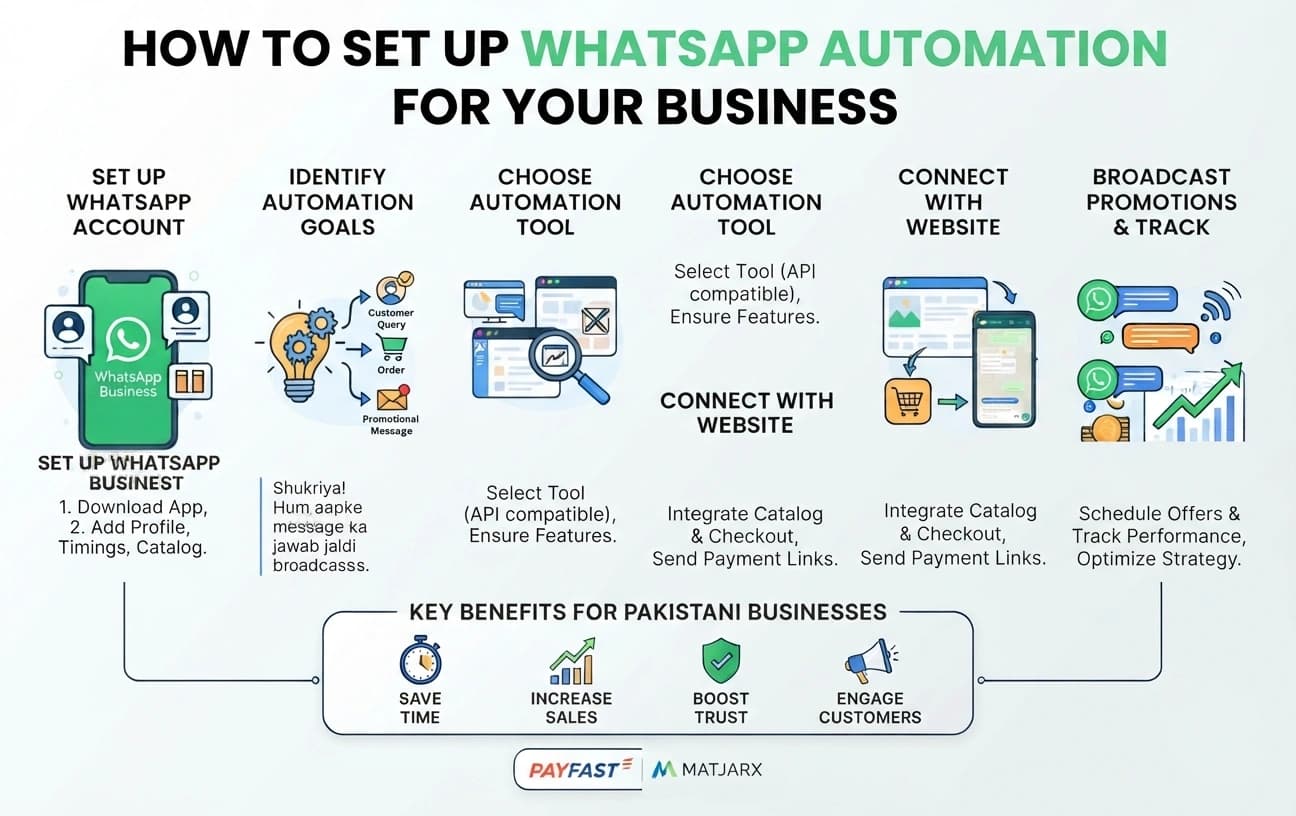
Step 1: Set Up a WhatsApp Business Account Before setting up automation, you first need a WhatsApp Business account for your company.
Steps:
Why it matters: A complete business profile helps build trust and strengthens credibility with your customers.
Step 2: Identify Your Automation Goals
Automation is most effective when your business goals are clearly defined.
Questions to ask:
Tip: Every business has different priorities and requirements. Decide in advance what processes you want to automate so you can maximize efficiency and customer satisfaction.
Step 3: Choose a WhatsApp Automation Tool To implement automation successfully, you need a reliable tool that supports WhatsApp API integration.
Steps:
Tip: A reliable automation tool saves valuable time, minimizes human errors, and significantly improves the overall customer experience.
Step 4: Set Up Auto-Responses
Auto-responses ensure that customers receive instant replies.
Steps:
Step 5: Connect Automation with Your Website
Integrating WhatsApp automation directly with your website can significantly increase conversions.
Steps:
Tip: Direct integration allows instant order confirmation, which improves customer satisfaction and reduces abandoned purchases.
Step 6: Broadcast Promotions & Offers WhatsApp automation is an effective way to share promotions, discounts, and updates with your customers.
Steps:
Outcome: Customers stay informed, engaged, and connected with your business without feeling overwhelmed.
Step 7: Track & Optimize Automation delivers better results when you regularly analyze its performance.
Steps:
Tip: Review your automation performance every week to refine your strategy, improve results, and maximize ROI.
Benefits of WhatsApp Automation
Implementing WhatsApp automation provides multiple advantages for Pakistani businesses:
Frequently Asked Questions (FAQs) Can WhatsApp automation work with small businesses?
Absolutely. Even small businesses can respond instantly and convert leads effectively.
Do I need coding skills to set it up?
No. Tools with WhatsApp API support are easy to integrate with MatjarX guidance.
How many auto-responses should I create?
Start with greetings, query acknowledgements, and order confirmations. Add more gradually.
Will automation feel impersonal to customers?
Not if messages are friendly and simple, like a human reply.
Can I integrate payments through WhatsApp?
Yes, MatjarX can connect your website checkout and payment links to WhatsApp messages.
Conclusion: Automate Your Business with WhatsApp
WhatsApp automation helps your business:
Stop losing orders due to slow responses. Set up WhatsApp automation with MatjarX and let your business communicate smarter, faster, and more effectively.
Sign up with MatjarX today to integrate WhatsApp automation and boost your business sales and operational efficiency! Follow MatjarX for step-by-step guides and business growth strategies.
Want this handled for you?
We build the whole website — design, copy, images, Google listing — and launch it in seven days from Rs. 22,500.
See plansLeads marketing at MatjarX and advises business owners on marketing strategy and search.
Keep reading


Want this done for you?
The work this article describes, and who we build it for.
- ServiceGrowth marketingAds, content and campaigns once the site is live.
- ServiceDone-for-you websiteWe build and launch it in 7 days.
- IndustryGyms & FitnessA website built for gyms & fitness.
- IndustryRestaurantsA website built for restaurants.
- LocationWebsite design in MuzaffargarhWhat we build for businesses there.
- LocationWebsite design in NawabshahWhat we build for businesses there.